Experience Revamp of the UNIQLO App
Elevate Your Shopping Experience:
Rediscover UNIQLO with My Redesigned App

Introduction
UNIQLO is a renowned global fashion brand that offers high-quality and affordable clothing for men, women, and children. However, the current experience presents several challenges such as unclear information hierarchy, unfriendly user workflows, and other issues.
My Role
-
User Researcher
-
Data Analyst
-
UI/UX Designer
Scope
-
Uesr Research
-
Design Thinking
-
User Flow
-
Wireframe
-
Prototype
-
Test
Timeline
around 2 weeks
Tools
-
Figma
-
Figjam
-
Typeform
Problem
The reputation of UNIQLO app being difficult to use has persisted among users in Taiwan. Despite multiple updates and iterations, the situation has not improved. In my user survey, 100% of the participants (30 respondents) rated the current app with 3 stars or less.
HMW improve the user experience to address the difficulties identified by users and increase user satisfaction?
Solution
To address these issues, I embarked on a redesign project for the UNIQLO app. My goal was to create a more intuitive and user-friendly experience that would enhance user satisfaction and streamline the shopping process. Through rigorous user testing and feedback analysis, I refined the solutions to ensure they met the needs and expectations of the target users.
Curious about design decisions? Jump to

Design process

Design thinking is a human-centered approach to problem-solving that is used to create innovative and effective solutions. It can help me focus on understanding the needs and perspectives of the users, identifying the underlying problems, and exploring and testing different solutions.
Empathize
The first stage of design thinking is to empathize with the users. This involves understanding their needs, goals, and pain points. It can be done through user research, surveys, interviews, and observations. For this research, I used Typeform to collect data from the respondents.
Secondary Research & User reviews
Secondary research in UI/UX refers to the process of collecting and analyzing existing data and information that has been previously gathered by other sources. This can include published articles, academic research, industry reports, user feedback, and competitor analysis.

By looking at case studies, articles, reviews of App Store and Play Store, etc, I found several problems that are often highlighted on the UNIQLO app, such as :
-
Not being user-friendly (inventory lookup function).
-
Users are difficult to use the search function and filter options.
-
The product images automatically redirect too frequently.
-
Returning to the previous page after browsing a product will scroll back to the top.
-
Users feel the category menu is too wordy and has too many subcategories.
Questionnaire
To get a better understanding of whom I was designing for:
-
What does a typical UNIQLO app user look like?
-
What are their reasons for using UNIQLO app?
-
What keeps them coming back?
I conducted this survey via Typeform, and gathered responses from approximately 30 participants, exploring their usage patterns, motivations for using the app, and the challenges they encountered. Additionally, participants were asked to provide their opinions on the common criticisms regarding the usability issues of UNIQLO APP mentioned by other online users.
Among the 30 participants, there were 15 males and 15 females. 90% of the respondents were aged between 18 and 30, while 10% of the respondents were aged between 30 and 50. I felt like this was a fair representative sample of UNIQLO's current user base since it aligns with its target audience in the market.
Research summary
Some of the summaries that I obtained when conducting the survey and divided into three initial research results :
Based on the reasons that motivate users to open the app:
-
78% of users want to browse for recently discounted products.
-
68% of users use the app to redeem coupons.
-
45% of users want to check the availability of products in physical stores.
-
35% of users want to know how fashion influencers style UNIQLO products.
Based on the obstacles the respondents mentioned the most:
-
Lack of sharing functionality
-
Difficulty in checking store inventory
-
Excessive automatic image switching
Based on the features the respondents value the most when using a fashion shopping app:
-
Clear product categorization:
-
Simple interface design
-
Convenient return/exchange policy and order tracking
-
Detailed product information to make informed decisions.
-
User-generated content and reviews (Users want to see real-life photos and reviews from other buyers.)

User pain point
Define
Persona
I created a user persona based on the research results to understand user behavior, needs, experience, and goals.
.png)
User journey map
The next step is creating a model of user journey map. The user journey map is a visualization of the process a user goes through in achieving goals. I also used this to inform my design decisions.

Ideate
In this stage, I create low-fidelity prototypes to test the ideas and validate the assumptions. This makes improvements also involves brainstorming, sketching, and creating rough prototypes. Before designing the prototypes, I also made a solution idea, affinity diagram, prioritization idea
Problem Solution
A solution idea involves understanding the needs and preferences of the target users, creating designs that address their pain points and provide a seamless user experience. These are solutions I have made for users.
_EN.png)
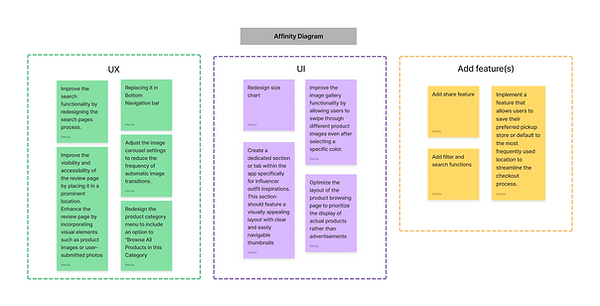
Affinity Diagram
An affinity diagram is a tool used in design thinking and UX to organize and categorize ideas, information, or data. It allows me to see the big picture and identify any opportunities or pain points in the user journey.
Prioritization Idea
To prioritize design elements for this steps, I used a simple priority matrix (High/Low impact, High/Low effort).
.png)
Wireframes
This is what the early wireframes looked like. I used Mid-Fidelity Design for the wireframe because it typically involves more detailed representations of the layout, structure, and functionality of the product than low-fidelity design but with less detail and visual polish than high-fidelity designs.

Usability Testing
To validate my designs and test prototypes, I turn these ideas into high-fidelity designs, then conduct a face-to-face usability test with 5 people. I asked the participants to complete several scenarios using the current version of the app and the redesigned version. Then record the time users took to complete the tasks and observe their movement patterns, mental models, and ability to complete their goals. Through multiple rounds of feedback, I was able to decrease the cognitive load of our users and make key information more accessible at a higher level.
Feedback from the participants
-
Most respondents do not pay close attention to the content of advertisements. Instead, they primarily rely on the visual appearance of the products in the images to determine their interest. Only if they find the product visually appealing will they further investigate the accompanying promotional offers.
-
All respondents agreed that not missing out on any coupons and discount events is crucial, and they expected the system to automatically apply applicable coupons and discounts during checkout.
-
The power of word-of-mouth, some of the participants indicated that their interest in specific products is influenced by recommendations from friends, family, and Key Opinion Leaders (KOLs) or YouTubers.
Final Design
Let's see some Before & After
-
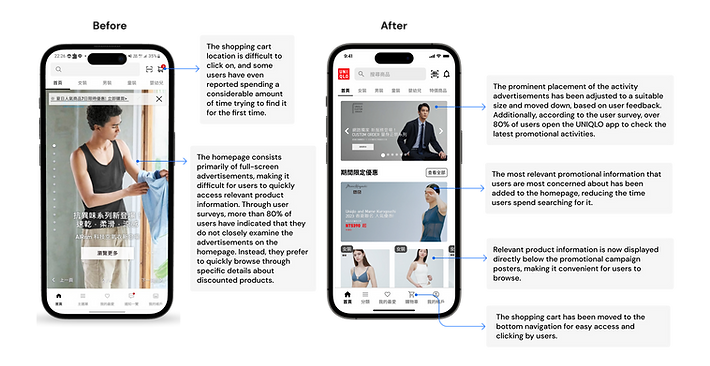
The homepage is no longer solely focused on promotional advertisements.
Through user surveys, more than 80% of users have indicated that they do not closely examine the advertisements on the homepage. Instead, they prefer to quickly browse through specific details about discounted products.

-
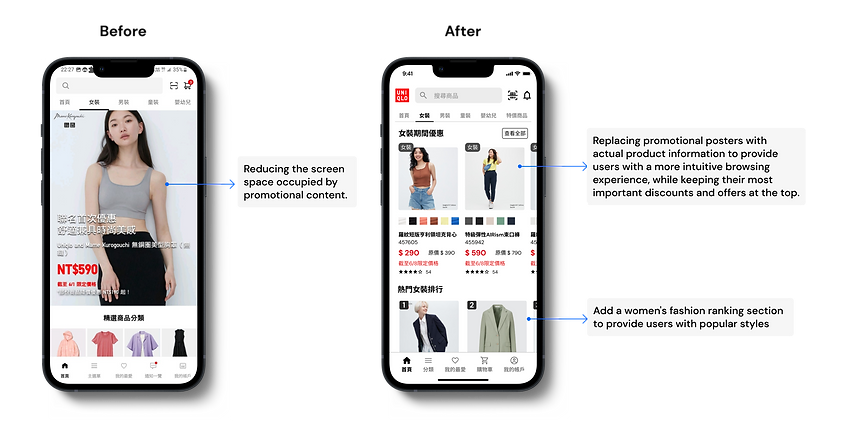
Improved UI design for the category homepage
Like the homepage, improve the oversized ad content and add "All Women's Clothing" for users who don't have a specific item in mind to browse casually.

-
Discover by categories
People can now navigate to find new things easily. Detailed breakdown below.

Based on my surveys, 75% of users have indicated that they have purchased UNIQLO's designer collaboration collections, with a satisfaction rate of 90%. This suggests that it is one of the best-selling items under UNIQLO. Therefore, I have placed it as a separate category in the top menu to make it more convenient for users to access and view.

-
Revamped product details page
I rearranged the information on the product detail page to tell a better story. Showcase related products or accessories that complement the item being viewed, encouraging users to explore more options.

-
Optimizing the workflow for the inventory lookup feature.
This is one of the most challenging features reported by users in terms of usability. The issue lies in the fact that users have to repeatedly click the "Search" button after selecting the color and size. Additionally, the presentation of the stores does not facilitate easy and quick identification of the desired option.

-
Improved review page
According to my user research, over 75% of users have expressed that having real-life photos from other buyers would help them make purchasing decisions more quickly. However, the current product reviews consist only of text.

-
Optimizing the checkout experience
I have made enhancements to improve the user experience, such as adding clear progress indicators and implementing automatic retrieval of recipient information. Detailed breakdown below:

-
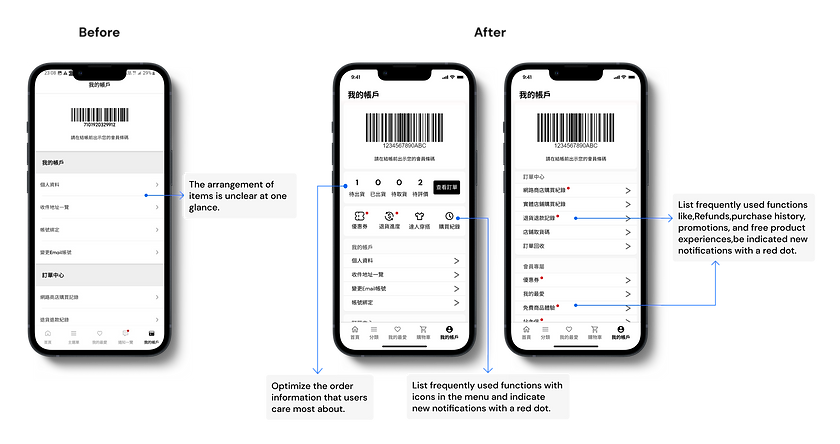
Account page with clearer messaging
Previously, all information was presented in a single linear layout. After multiple iterations and user research, I have redesigned the layout of the app by reorganizing the order tracking feature and the integration of UNIQLO's flagship app: Style Hint
Time to wrap up
With this project, I learned the role visual design plays in reflecting the mission and values of a brand. It is so important (and SO difficult) to spend time developing the visual design aesthetic to convey what the brand means to millions of users.
Furthermore, conducting thorough user research is crucial in understanding the pain points, preferences, and needs of the target audience. By gathering user insights and feedback, we gained a deeper understanding of their expectations and were able to address their specific needs in the redesign.
Future
As I solely focused on user research for this design optimization, it is important to note that design also needs to consider the business considerations of the brand. This includes UNIQLO's market strategy and sales process in order to develop the app's user flow. Therefore, I hope to incorporate both user and business perspectives more comprehensively in future implementations to make the best design decisions.